Announcements and Audience
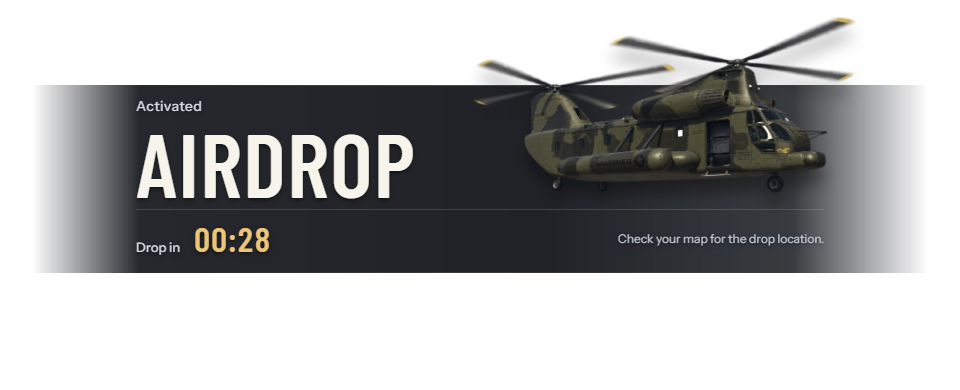
Config.AnnouncementEnabled = true enables the top-screen activation banner. Set it to false in config/config.lua and restart the resource to disable it globally. World smoke, blips, countdowns and delivery continue independently.
A manual, scheduled or automatic drop can display a banner to connected players. The countdown shows the time until helicopter dispatch or direct container placement. It does not estimate landing time. If the banner is still visible when the countdown reaches zero, it displays the dispatched message.
The banner begins fading out after 8 seconds. Additional announcements queue automatically. Removing a drop also removes its announcement. Players who join afterward do not receive the original banner. Reduced-motion preferences disable the banner animations.
Audience configuration
Edit the server-only config/announcement.lua:
Config.AnnouncementAudience = {
    allow = {},
    deny = {},
}
An empty allow means everyone is initially eligible. A nonempty allow requires any one rule to match. Any matching deny excludes the player, including administrators. Deny wins.
Audience rules use player information at the time the drop is created. Later job changes do not withdraw an announcement already queued. Rules affect only the announcement. They do not hide the drop or restrict access to its stash.
Selectors
Each table rule contains exactly one selector, or one combination operator. Names are exact and case-sensitive; use technical identifiers, not display labels. A selector accepts a string or nonempty array of strings, with any name in that array matching. There are no implicit wildcards.
| Selector | Example | Meaning |
|---|---|---|
job | {job = {'police', 'sheriff'}} | Current job, or assigned jobs with supported all-scope data. |
gang | {gang = 'ballas'} | QBCore/Qbox gang data. |
jobType | {jobType = 'leo'} | Defined QB/QBX job type. |
group | {group = 'admin'} | ESX player group; not a faction or ACE principal. |
ace | {ace = 'airdrop.announcement'} | Required ACE permission. |
identifier | {identifier = 'license:EXAMPLE'} | Exact platform identifier. Replace the example with a real full identifier. |
character | {character = 'EXAMPLE_CHARACTER'} | QB/QBX citizen ID or full ESX character identifier. |
An ESX character identifier may include a multicharacter prefix. A Discord identifier identifies an account; it does not check Discord role membership. Use ACE permissions or a custom audience rule for role-based restrictions.
Membership modifiers
Only job, gang and jobType support these modifiers:
| Modifier | Accepted value | Meaning |
|---|---|---|
scope | 'primary' or 'all' | Default current membership. Qbox all-scope can include additional assignments. |
minGrade, maxGrade | Nonnegative integer | Inclusive grade range, including zero. |
grades | Nonempty array of nonnegative integers | Exact allowed grades. |
gradeNames | Name or nonempty names array | Technical grade names. |
onDuty | Boolean | Job/jobType with primary scope only. Not valid for gang or all scope. |
boss | Boolean | Membership boss flag where the framework provides it. |
All conditions in a rule must hold. QBCore and ESX job rules use the current job; Qbox can also use additional assignments with scope = 'all'. ESX duty rules require job.onDuty, and the supplied ESX integration does not provide gangs. Use only conditions supported by your framework, or add a custom audience rule for other membership data.
Combine rules
all, any and none combine nonempty rule arrays. A combination cannot also contain selector or modifier keys.
| Operator | Result |
|---|---|
all | Every nested rule must match. |
any | At least one nested rule must match. |
none | No nested rule may match. |
Everyone except police and Ballas
Config.AnnouncementAudience = {
    allow = {},
    deny = {
        {job = {'police', 'sheriff'}},
        {gang = 'ballas'},
    },
}
Use the gang rule only with a framework that supplies that membership data.
On-duty officers or a chosen gang
Config.AnnouncementAudience = {
    allow = {
        {job = {'police', 'sheriff'}, minGrade = 2, onDuty = true},
        {gang = 'ballas', minGrade = 1},
    },
    deny = {},
}
Qbox additional assignments
Config.AnnouncementAudience = {
    allow = {{gang = 'ballas', scope = 'all'}},
    deny = {{job = 'police', scope = 'all'}},
}
This can exclude a player with a police assignment even when another job is currently primary. Do not add onDuty to an all-scope rule.
ESX jobs and administrator group
Config.AnnouncementAudience = {
    allow = {{job = 'mafia', minGrade = 1}, {group = 'admin'}},
    deny = {},
}
Membership plus an ACE gate
Config.AnnouncementAudience = {
    allow = {{all = {
        {any = {{job = 'police'}, {gang = 'ballas'}}},
        {ace = 'airdrop.announcement'},
        {none = {{ace = 'airdrop.announcement.blocked'}}},
    }}},
    deny = {},
}
These ACE object names are examples for your policy. Writing an audience rule does not grant the ACE.
Custom audience rules
Custom audience integrations can be added through the editable config/announcement.lua and bridge/ files. Contact support for requirements beyond the supplied selectors and framework integrations.
Failure behavior
If expected players do not receive announcements, check job names, grades, character identifiers and ACE permissions against your server configuration. Use selectors supported by your framework. Enable Config.Debug for diagnostics and see Troubleshooting.